LightPlot
Jul'2026
Creator, with Claude Code
A free, browser-based previsualization sketchpad for stage lighting and projection design.
Light Plot lets directors, lighting designers, students and production teams sketch a rig, test a color story, block performers and check a projection screen before anyone walks into the theatre. It runs as a single HTML file: no install, no login, no server, no account. Open it in a browser and start placing lights.
Live version: https://gauravnijjer.github.io/LightPlot
Made by Gaurav Singh Nijjer, a theater director and installation artist, originally for his own process of walking into unfamiliar venues with very little time before tech.
WHAT IT DOES
MULTI AXIS VIEW
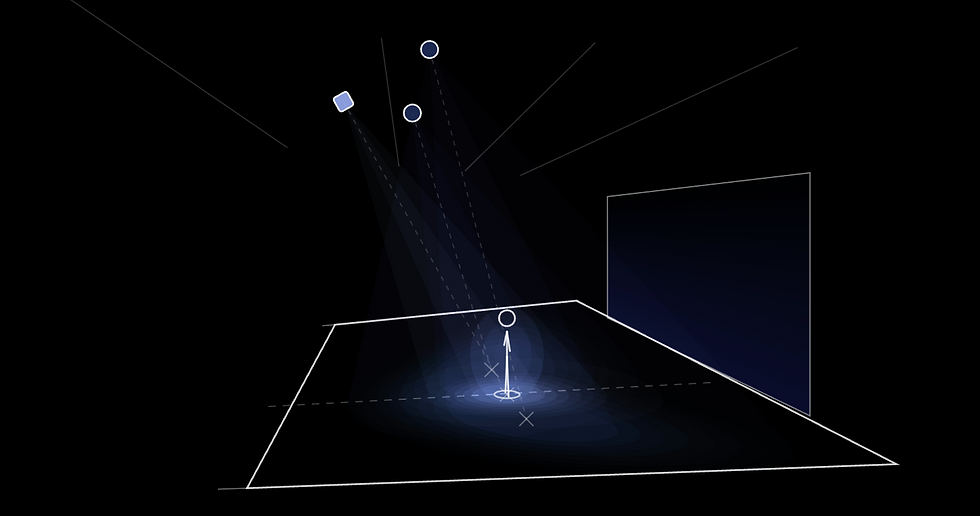
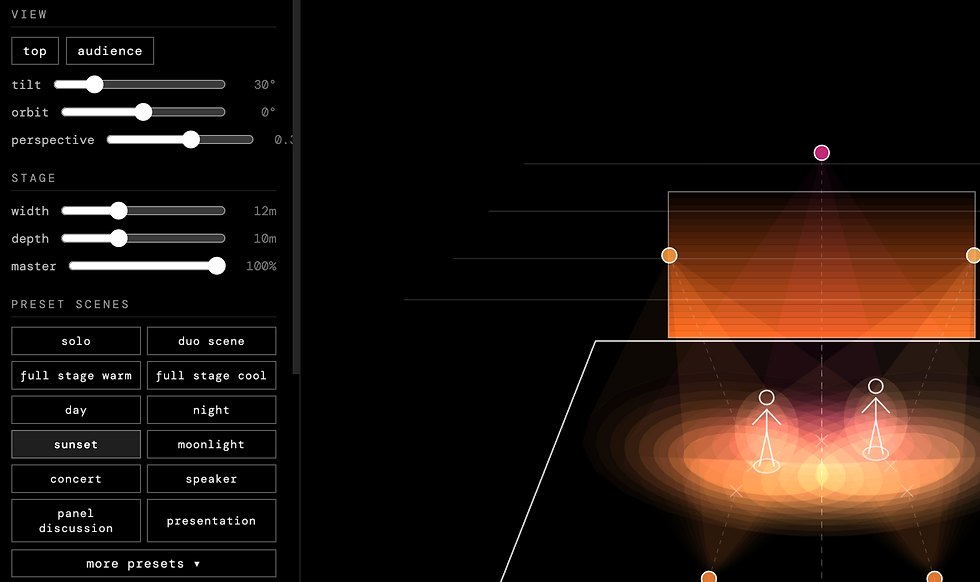
Two views of the stage, one gesture apart. The tool opens in a top view (plan). Drag the empty canvas downward and the camera tilts smoothly into an audience point of view. Right-drag orbits the camera up to 80° toward stage left or right, so side light and diagonal sightlines can be checked too.
REAL BEAM GEOMETRY
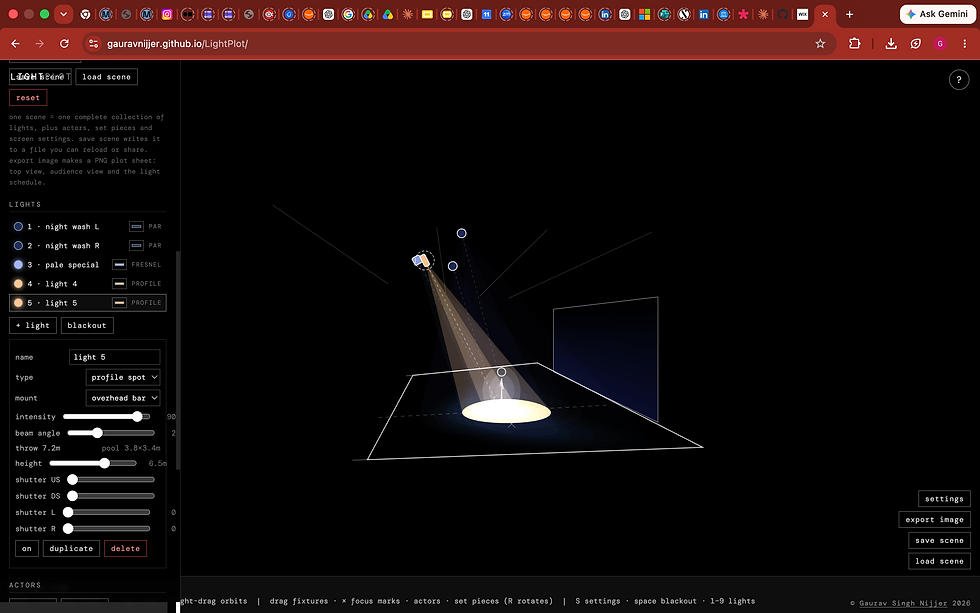
Every fixture has a beam angle, and the pool it throws is computed as a true cone-to-floor intersection. Point a light straight down and you get a circle. Throw it across the stage at an angle and the pool stretches into a genuine ellipse elongating away from the fixture, exactly the way a torch behaves on a table. Pools grow with throw distance, so hang height and position decisions are physically meaningful.
FIXTURE TYPES
1. Profile spot: hard-edged pool with a hot center, plus four shutter sliders (upstage, downstage, left, right) that cut the field with real clip geometry.
2. Fresnel: soft graduated edge with a faint spill that carries past the field edge.
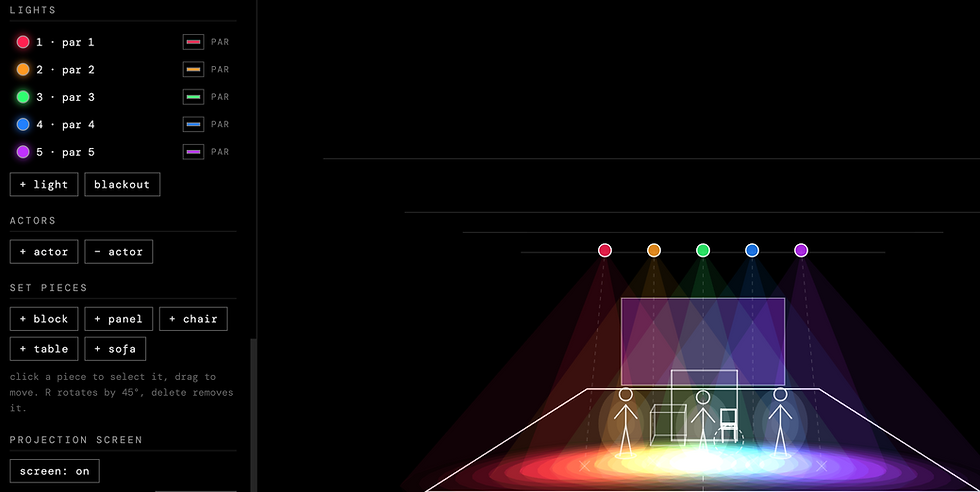
3. Par / wash: an oblong beam, like a real PAR lamp, with a rotation control to spin the oval around the beam axis.
- Additive color mixing. Light pools mix the way real light does. Cross a blue profile and a red profile and the overlap builds magenta; add green and the center heads toward white.
-FLEXIBLE MOUNTING
Hang fixtures on overhead bars, at FOH, on left or right side booms, or on the floor. Reference bars (FOH, LX1–LX3) are drawn in, and floor or boom units get a stand in the audience view.
PERFORMERS
White line figures, 1.75m tall, draggable at any time. Each figure picks up a glow in the mixed color of exactly the light that is actually hitting it, shutter cuts included.
Set pieces. Basic white wireframe furniture (block, panel, chair, table, sofa) for checking compositions and sightlines against real objects. Click to select, drag to move, R rotates, delete removes.
Projection screen. An upstage screen with adjustable width, height and position, fed by a flat wash, a vertical gradient, a focus grid, or an image you upload. It respects the master fader and blackout.
PRESET SCENES
Twelve everyday looks up front (solo, duo scene, full stage warm, full stage cool, day, night, sunset, moonlight, concert, speaker, panel discussion, presentation) and fourteen more behind a fold (dawn, dusk, storm, dream, forest, underwater, fire, candlelight, film noir, silhouette, party, cabaret, horror, three-point, dance sides). Presets scale to your stage dimensions and are meant to be pulled apart and rebuilt.
EXPORT AND IMPORT SCENE SETTINGS
One scene is one complete stage picture: every light with its color, focus, angle and shutters, the performers, the set pieces and the screen. Save it as a file, reload it later, or share it with a collaborator who opens it in their own browser.
SAVE SCENE SETTINGS
One click produces a PNG containing the top view, the audience view, and a full light schedule: channel, name, type, color with a swatch, intensity, beam angle, measured pool size, hang position, focus position and state. Made to be dropped into an email to a venue or a production meeting.
----
LightPlot is built on p5.js and was made using Claude Code (Anthropic), with design direction, testing and feature decisions by Gaurav Singh Nijjer. This is a beta, shared in the open because other designers and directors might get some use out of it. If something breaks, feels wrong, or is missing the one feature you need, please write to gauravnijjer@gmail.com. Corrections from working performing arts professionals are especially welcome.
_edited.jpg)
Light Plot began in my own rehearsal rooms. As a director I kept walking into venues I'd never worked in, with designers and collaborators trying to describe looks to each other in words, and very little time before tech to find out whether we meant the same thing. I wanted tools that let a team see a shared picture early: a light plot, a projection plan, a stage layout that anyone could open on a laptop and point at. Serious visualizers already exist, Capture and others, and they do far more than this ever will. I just wanted one that's easy, works in the browser, and can be picked up within 30 seconds of looking at it. So I designed this one, and its companions, around the actual needs of that room, free, single-file, no login, nothing locked away.
It's also part of my larger practice. My work in theatre and installation uses creative code and technology to examine AI critically while using it generously, and initiatives like this suite are the constructive half of that: putting AI to work in ways that give agency to artists rather than take it away, widening who gets to previsualize, plan and dream before build day. I come to this with a long history in web development, creative coding and design, which is what shaped every decision here about how the tool should feel and what it should refuse to complicate.
The code itself was built in collaboration with Claude, Anthropic's AI assistant, through Claude Code, across many rounds of my direction, testing and revision. I name that openly because honesty about the making is part of using these systems well, and because the judgment about what deserved to exist stayed human throughout.
Important Note
Light Plot is an indicative design planning tool, not a photometric simulator. So that you know exactly where the line sits:
- Pools are true cone–floor intersections, so shape and size respond correctly to beam angle, throw distance and throw angle. Grazing throws that would run to the horizon are clamped for drawability.
- Color mixing is additive RGB. Real gels and LED engines have spectra that mix less cleanly.
- Intensity is a relative fader, not lumens or lux. There is no falloff-over-distance photometry, no fixture library with real photometric files, and no surface reflectance model.
- Shutter cuts are clean straight lines; real shutters have some softness depending on focus.
- Beams render as haze cones for readability regardless of whether your venue has haze.
- The actual light mixing and throws may be different and subject to other circumstances. Treat everything here as a shared starting point for the conversation, and confirm on the ground with the real rig.
License and Usage
Creative Commons Attribution-NonCommercial 4.0 International (CC BY-NC 4.0)
You are free to use and share this tool for personal and educational use, with attribution to Gaurav Singh Nijjer. Commercial use is not permitted without written permission. For commercial licensing enquiries, contact gauravnijjer@gmail.com.
Full license text: https://creativecommons.org/licenses/by-nc/4.0/
© Gaurav Singh Nijjer 2026 · gauravnijjer.com
Project Gallery